Prompt detail

Human Percaline

Uploaded by celebish New on Apr 6, 2026
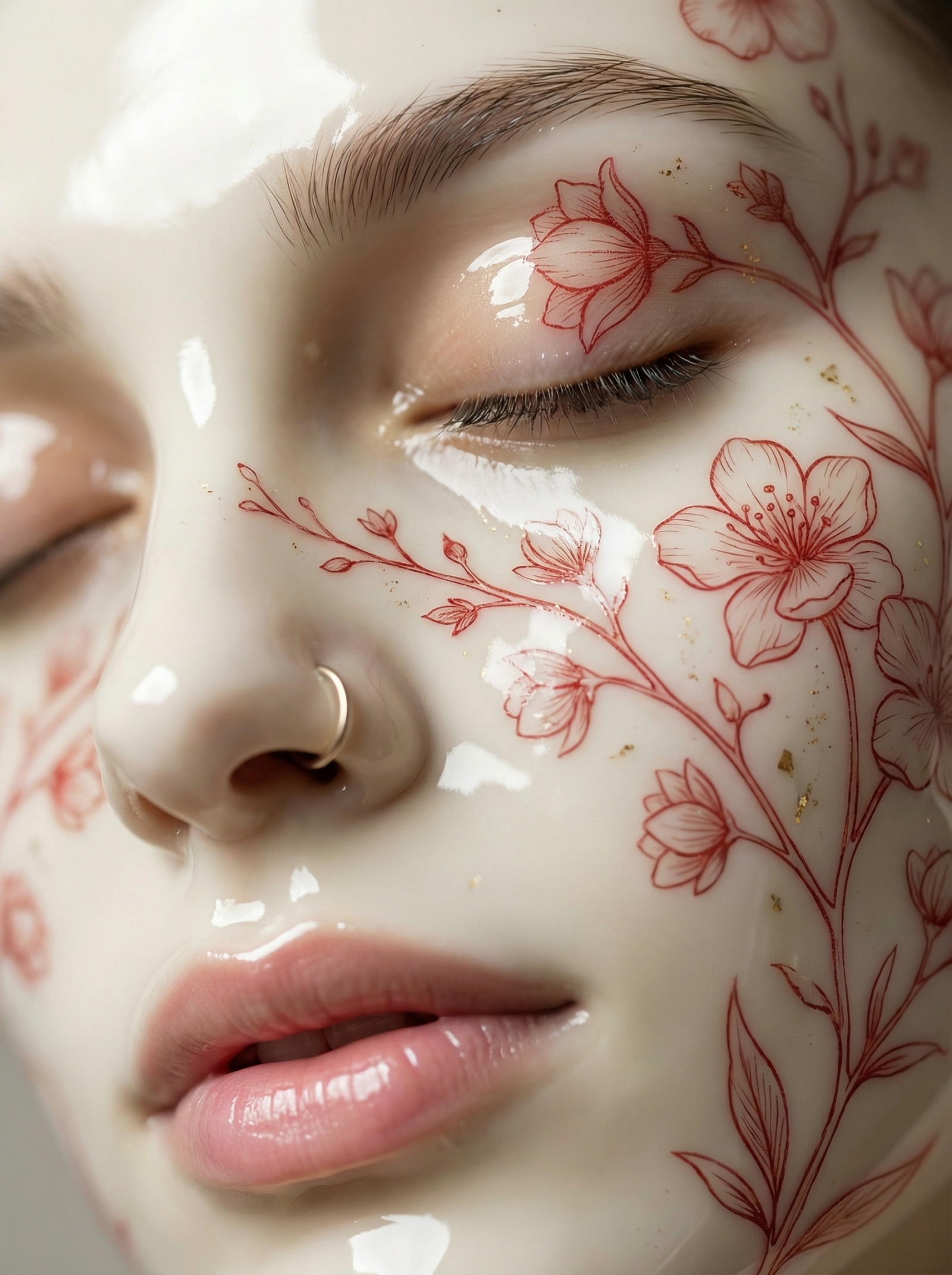
Human Percaline, female, using Nano Banana Pro AI image prompt
Prompt setup
Nano Banana Pro Editorial Score 0
0
0 up · 0 down · 0 favorites

Prompt

Use ref1 as the exact facial identity. Do not alter bone structure, proportions, or facial features.

Extreme macro close-up portrait of the same woman from ref1, face filling the frame, eyes closed, lips softly parted. Camera positioned slightly above and angled down across the face, focusing on one eye, nose bridge, and lips in shallow depth of field.

Skin appears transformed into smooth, high-gloss porcelain ceramic — not makeup, not paint — a fused material surface. Across the porcelain skin are delicate red botanical line-art illustrations of flowers and fine branching stems, embedded seamlessly into the surface like ink beneath glaze.

The floral lines follow the natural contours of the face, wrapping across the eyelid, cheek, and nose bridge with precision. Some areas include subtle gold fleck detailing embedded in the surface.

Lighting is soft, diffused, studio macro lighting with gentle specular highlights that reveal the ceramic sheen without blowing out detail. Skin texture is no longer visible — replaced by flawless porcelain smoothness — but facial identity must remain intact.

Color palette is minimal: creamy white porcelain skin, soft muted red linework, natural pink lips, subtle gold accents.

No harsh contrast, no heavy shadows, no stylization drift.

CRITICAL CONSTRAINTS:
- Do not interpret as face paint or makeup
- Do not add 3D raised texture to the floral lines
- Do not distort facial anatomy
- Do not change ethnicity or identity
- Maintain exact likeness to ref1

STYLE TAGS:
ultra-realistic, macro photography, ceramic skin, botanical line art, luxury editorial, fine art beauty, 8k detail
Share

Help This Prompt Grow

Please help by sharing this prompt. Every post helps more people discover the site.

Variations

Variations of This Prompt

Build on this prompt

Start from the original prompt and push the look, lighting, styling, or composition in a new direction.

Create Variation
More Like This

Similar Prompts
Next Step

Create your own version of this

Start from the same core prompt and push it in a new direction.

Create Variation