Prompt detail

Photo Restore - Black and White

Uploaded by celebish New on Apr 14, 2026
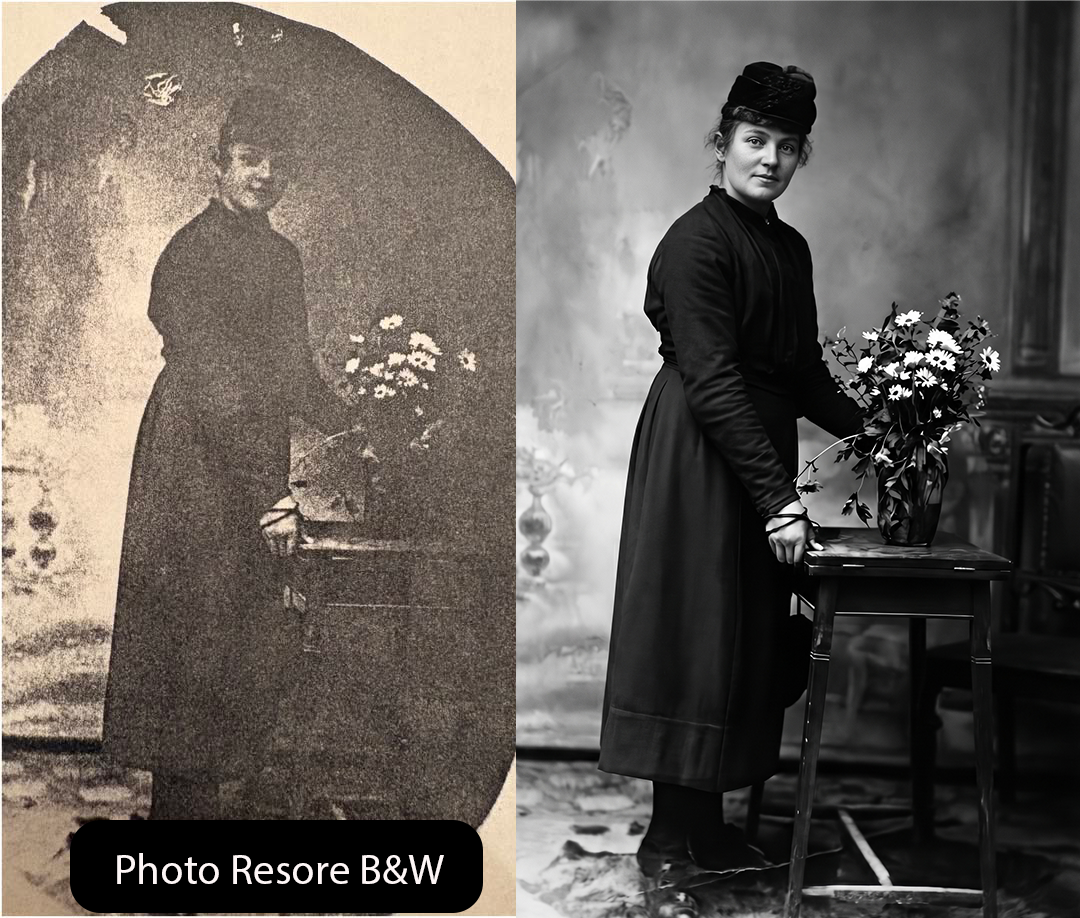
Photo Restore - Black and White, black & white, using Nano Banana Pro AI image prompt
Prompt setup
Nano Banana Pro Uncategorized Score 0
Based on: Photo Restore

Instructions

Upload an old photo to create a clean black and white version.

0
0 up · 0 down · 0 favorites

Prompt

Upscale and enhance the attached source image to true 8K UHD (7680×4320) with a 4x upscale factor, delivering a masterpiece-level, ultra-detailed, hyper-realistic result. Preserve the exact same face with 100% facial similarity-no alterations, morphing, or distortion of facial features. Maintain original skin and surface textures while subtly enhancing micro-details and increasing sharpness (1.5) for crisp clarity. Apply low denoising strength (0.25) to retain natural realism.

Enhance with cinematic lighting, sharp focus, intricate texture depth, seamless high-quality gradients, and vibrant yet natural colors with professional color correction and strong gradient refinement. Avoid any plastic, over-smoothed, blurry, waxy skin, flat textures, pixelation, noise, JPEG artifacts, washed-out tones, CGI/cartoon/3D-render look, loss of detail, distorted eyes, or identity changes.

Use DPM++ 2M Karras sampler, 50 steps, and CFG scale 7.0 to ensure a photorealistic, raw photography finish that significantly improves clarity and depth while staying faithful to the original image
Share

Help This Prompt Grow

Please help by sharing this prompt. Every post helps more people discover the site.

Variations

Variations of This Prompt

More Like This

Similar Prompts
Next Step

Create your own version of this

Start from the same core prompt and push it in a new direction.

Create Variation